

You open Search Console and see hundreds of URLs that should not exist.
Spam injections.
Old landing pages.
Migration leftovers.
You know they need to be removed permanently. You just want to do it cleanly without breaking something else.
If you are using WordPress, Rank Math provides one of the safest ways to return a 410 status without touching server files.
This guide focuses on execution.
Before implementing large scale removals, make sure you understand when a bulk 410 redirect is strategically appropriate. Implementation without evaluation can create structural instability.
As an SEO consultant, I treat large scale URL removal as an architectural decision first and a technical action second.
This guide focuses on execution.
Before implementing large scale removals, make sure you understand when a bulk 410 redirect is strategically appropriate. Implementation without evaluation can create structural instability.
As an SEO consultant, I treat large scale URL removal as an architectural decision first and a technical action second.
Step 1: Enable the Redirections Module
Before creating redirects:
- Go to WordPress Dashboard → Rank Math SEO → Dashboard → Modules
- Switch to Advanced Mode
- Toggle on Redirections
- Save changes
Without Advanced Mode enabled, the Redirections module will not appear.

Step 2: Navigate to the Redirections Screen
Go to:
WordPress Dashboard → Rank Math SEO → Redirections
Click Add New.
You will now see the redirection configuration form.
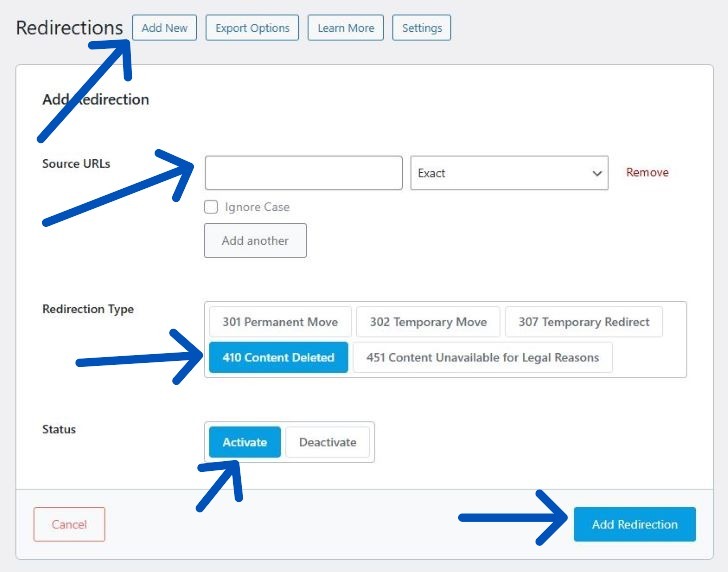
Step 3: Add Your Source URLs (Including Multiple URLs)
The Source URL field is where you enter the URL you want to remove or redirect.
Important details:
- You can add the full URL including https and domain
- Or just the path starting from /
- Rank Math automatically normalizes formatting
Adding Multiple URLs
You can create multiple source entries by:
- Clicking Add Another under the Source URL field
- Adding as many source paths as needed
This creates a many-to-one structure under a single rule.
For very large deployments, CSV import is significantly more efficient.
Step 4: Understand Match Types
Rank Math allows you to control how URLs are matched.
Available Match Types:
Exact Match
Redirects only if the URL matches exactly.
Best for precise removals.
Contains
Redirects any URL that contains a specific term.
Useful for cleaning injected parameter patterns or keyword spam.
Start With
Redirects URLs that begin with a defined string.
Ideal for folder-level cleanup.
End With
Redirects URLs that end with a defined string.
Helpful for extension-based cleanup.
Regex
Allows advanced pattern matching using regular expressions.
Regex is powerful, but it removes pattern based segments of your site. Test carefully before activation.
A poorly written regex rule can remove unintended sections of your site.
If you are unfamiliar with regex, test carefully before activation.
Step 5: Choose the Correct Response Type
Under the configuration panel you will see:
- Redirection Type
- Maintenance Code
If your content is permanently deleted and has no replacement, you should not use a redirect type.
Instead, use a Maintenance Code.
Step 6: Select 410 Content Deleted
Under Maintenance Code, choose:
410 Content Deleted
Important:
You cannot use both a redirection type and a maintenance code at the same time.
Once you select 410:
- Redirection Type becomes disabled
- The page returns a proper 410 status
- Search engines are instructed to deindex the page naturally
Set Status to Activate.
Click Add Redirection.
Your URLs now return 410 correctly.
If you are unsure whether 410 is appropriate for your situation, review when to use 410 instead of 301 before activation.
Step 7: Bulk Import via CSV (PRO Feature)
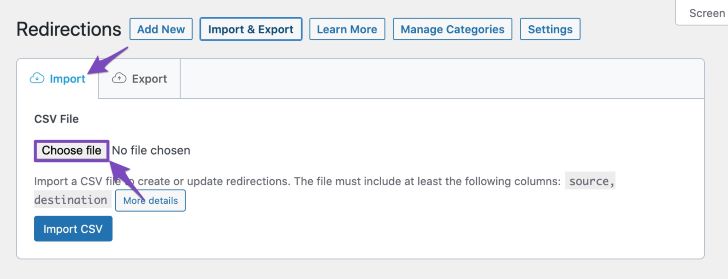
If you are managing hundreds or thousands of URLs:
- Go to Redirections
- Click Export → Export CSV
- Modify your file
- Import CSV
The CSV includes fields such as:
- id
- source
- matching
- destination
- type
- status
- ignore
To delete a redirection via CSV, set the destination column to DELETE.
For large scale cleanup, CSV import reduces operational risk compared to manual rule creation.
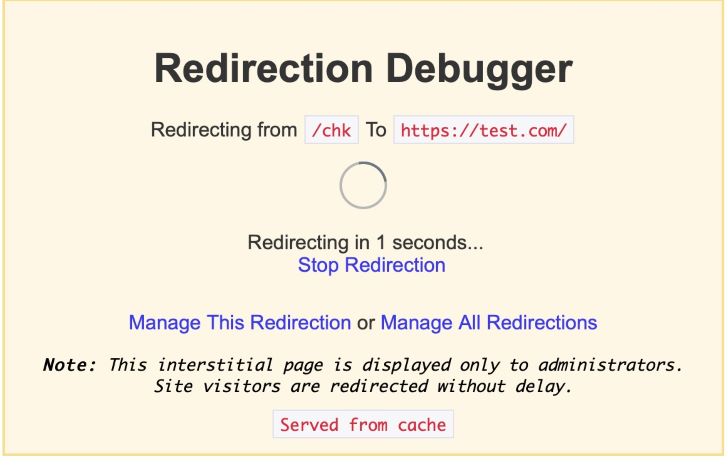
Step 8: Debug Redirect Issues
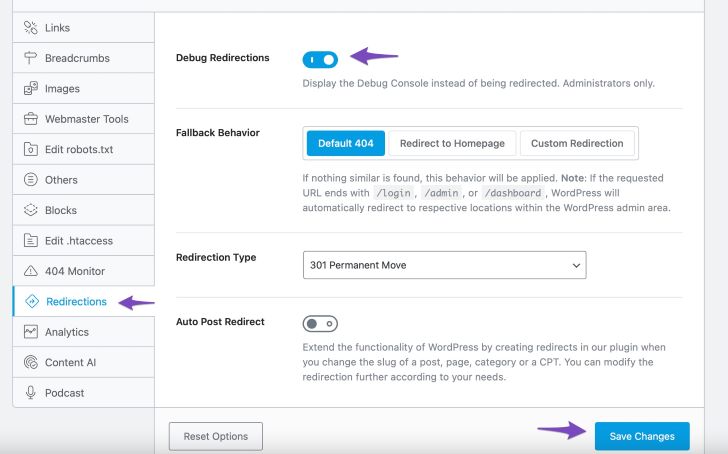
If unexpected redirects occur:
Enable Debug Redirections in Settings.
This shows an interstitial that:
- Identifies which rule triggered the redirect
- Allows direct editing
- Helps diagnose overlapping rules
- Prevents redirect loops
This is especially important when using pattern matching.
Step 9: Monitor Redirect Statistics
Rank Math tracks:
- Total hits
- Creation time
- Last accessed timestamp
This helps you evaluate:
- Whether bots are still hitting removed URLs
- Whether deindexing is progressing
- Whether cleanup requires refinement
If you want a deeper understanding of how removal impacts crawl behavior, review how crawl budget behaves after mass 410 deployment.
When Should You Use 410 Instead of 404?
A 410 signals intentional permanent removal.
A 404 signals content not found but does not always imply permanence.
If you want clarity around removal signals, review the difference between 410 and 404.
Choosing the wrong status code can delay deindexing or cause unintended authority loss.
Get Rank Math SEO for Structured Redirect Control
If you regularly manage hacked URL cleanup, thin content pruning, or post-migration debris, having redirect control inside WordPress reduces implementation risk.
Rank Math provides structured redirect governance without requiring server-level edits.
The Free version is sufficient for most small deployments.
The PRO version is useful when CSV-based bulk management becomes necessary.
Download Rank Math SEO (Free) or access PRO for CSV bulk imports here

Common Mistakes to Avoid
- Redirecting permanently deleted URLs with 301
- Redirecting unrelated URLs to the homepage
- Leaving removed URLs returning 200 status
- Using regex without testing
- Failing to remove internal links to deleted URLs
Implementation is easy.
Structural thinking is what prevents instability.
Frequently Asked Questions
Can I Add Multiple URLs in Rank Math?
Yes. You can add multiple Source URL entries manually or import them via CSV.
Where Do I Select 410 in Rank Math?
Under Maintenance Code, choose “410 Content Deleted.”
Can I Use 410 and 301 Together?
No. Rank Math disables one when the other is selected.
Does Rank Math Track Redirect Hits?
Yes. It records total hits and last accessed timestamps.